


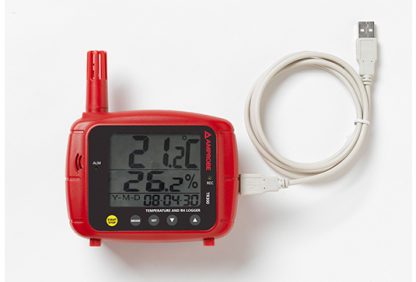
Product Overview
The Amprobe TR300 is a temperature and relative humidity data logger for indoor air quality monitoring. The device records temperature and relative humidity, displays real-time data on a large digital display, and features both visible and audible alarms. Configuration and data transfer are done via the Amprobe Download Suite software.
Features
- Measures temperature and relative humidity
- Large digital triple display with real-time date/time stamp
- Visible LED and audible alerts (HI/LO alarm thresholds configurable via software)
- Optional mounting options: wall mount, tabletop stand, or tripod
- USB interface and Amprobe Download Suite for setup and data readout
- Included accessories: USB cable, Download Suite software CD, tabletop stands, user manual, and 4×AA batteries
Documentation
The manufacturer's official datasheet contains the technical details and specifications for the Amprobe TR300: View datasheet from manufacturer.
Typical Applications
The Amprobe TR300 is used for indoor air quality monitoring by recording temperature and relative humidity. The device's alarm functions and data logging enable recording and subsequent analysis via the Amprobe Download Suite.
Specifications
- Product: Amprobe TR300
- Range, relative humidity: 0 to 100%
- Range, temperature: -20 to 70°C (-4 to 158°F)
- Accuracy, relative humidity: ±3% at 10–90%; ±5% at other ranges
- Accuracy, temperature: ±0.6°C (±1°F) at 0–50°C; ±1.2°C (±2°F) at other ranges
- Resolution: Temperature 0.1°C/0.1°F; Humidity 0.1%
- Memory points: choice of 1000, 2000, 4000, 6000, 8000, 12000, and 16000
- Battery type: 4 × AA (included)
- Battery life: approx. 150 hours
- Dimensions: 175 × 42 × 16 mm
- Weight: 0.282 kg
- Operating temperature: -20 to 70°C
- Operating humidity: 0–100% RH
- Storage temperature: -20 to 70°C
- Display: Temperature, relative humidity, possibility of dew point (DP) and choice between °C/°F
- Certification: CE (indicated by manufacturer)
- Included accessories: USB cable, Amprobe Download Suite CD, tabletop stands, user manual, and batteries
Content generated using AI – we reserve the right for errors.
Contact HIN for further information about the product.